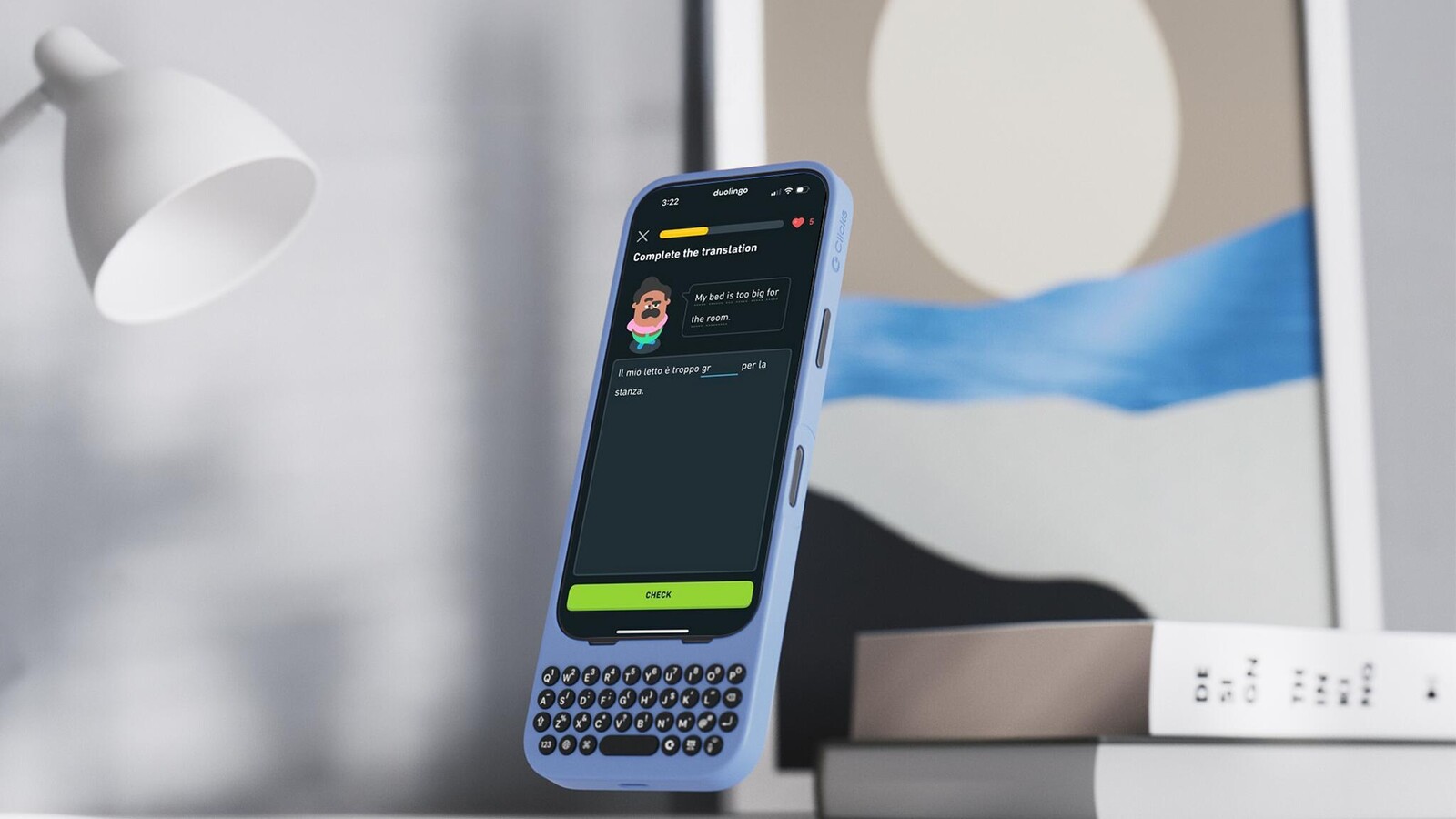
Learning a new language can feel like climbing a mountain, but with the right tools and strategies, I've learned that it's possible to accelerate your progress. While Duolingo and other language apps are fantastic for getting started, I found that a surprising element—something as simple as typing—made all the difference in my ability to learn Italian in just two months.
Here's the twist: it wasn't just about the content or the lessons (although Duolingo truly does excel here); it was about how I typed each word. The process of sounding it out, thinking about use of possession, and challenging which letter makes the correct sound. Did you know the Italian alphabet doesn't include the letters J, K, W, X and Y?! Simply put, when I started using Duolingo with a physical keyboard and real buttons vs. typing on glass, everything started to…well, click!
It turns out there's real science behind why typing on a physical keyboard (instead of tapping on a glass screen) is more effective for learning. Let me break it down and explain how it worked for me.
The Science Behind Typing on Physical Buttons vs. Tapping on Glass
Let's get a little scientific for a moment. Research shows that handwriting fires up more brain activity than typing. Why? Because writing by hand engages complex motor skills and spatial awareness, making it a deeply cognitive process. However, what if I told you that typing on a physical keyboard could engage your brain in a similar way, even though it's not exactly the same as handwriting?
Typing on physical keys provides tactile feedback—think about the click and resistance of each key. These sensations engage the somatosensory system in a way that tapping a flat touchscreen doesn't. You're not just passively typing; you're using your motor skills and your brain's processing power more effectively.
For example, when using a virtual keyboard, autocorrect tends to do most of the work for you. You're relying on muscle memory and letting the software fill in the gaps, reducing cognitive engagement. On a physical keyboard, there's no autocorrect to save you. You have to actively engage with the language, recalling the correct spelling, structure, and pronunciation of each word.
Active Learning: The Key to Language Mastery
This is where Clicks, a physical keyboard case for your smartphone, comes in. It might sound like a gimmick, but using Clicks transformed my Italian learning experience. Here's how it works:
1. No Autocorrect, No Cheating
With Clicks, typing doesn't come with automatic suggestions or corrections. This means you can't breeze through the lesson without truly engaging with the language. You have to think about each word, sound it out, and make sure you're spelling it correctly. This hands-on approach forces you to be actively involved in the learning process, making it more effective than relying on virtual keyboards.
2. Better Focus with More Screen Space
Clicks isn't just a physical keyboard—it also provides more screen real estate. The extra space lets you see the full context of your Duolingo lesson while typing. This helps your brain make connections between words and sentences, improving your understanding of grammar and structure. The extra space means you can absorb more, while your hands are doing the physical work of typing.
3. Building True Muscle Memory
When you type on a physical keyboard, you're not just training your brain; you're training your fingers, too. Over time, typing in a new language becomes second nature. You develop muscle memory for the language, making it easier to type—and think—in Italian. It's not just about remembering words; your brain and fingers work together to make language learning more fluid.
Why It Worked for Me
Before using Clicks, I was relying heavily on my iPhone's virtual keyboard. While Duolingo helped me pick up basic vocabulary, I wasn't retaining the words or sentence structures as well as I wanted. Autocorrect was constantly helping me out, and I wasn't actively thinking about the language as much as I should have been.
Once I switched to Clicks, everything changed. Without autocorrect, I had to focus more on spelling, pronunciation, and the structure of the language. And the physical feedback of pressing buttons rather than tapping on glass made my brain engage more deeply with the task at hand. Suddenly, I wasn't just learning words—I was understanding how the language worked, feeling more confident in my abilities, and building real muscle memory.
Ready to Turbocharge Your Learning?
If you're serious about language learning, the key isn't just in the apps you use but in how you use them. By switching to a physical keyboard like Clicks, I found myself learning faster, retaining more, and engaging more deeply with Italian than ever before. Typing on physical buttons fires up brain activity in a way that's impossible to replicate with a touchscreen. It's like adding a secret weapon to your language-learning arsenal.
3 Comments
Optional descriptive text: Lorem ipsum dolor sit amet, consectetur adipiscing elit.
Vanessa T.
Mon Mar 10, 2025
Using Clicks has completely transformed how I'm learning French on Duolingo! As someone heading to France for a few months soon for work, I used to rely on the auto-correct feature of my phone's keyboard to breeze through lessons. But with Clicks, I'm now forced to really engage with each word. If you're serious about learning a language, Clicks is a must-have!
Kevin M.
Mon Apr 1, 2024
My wife is Italian and I've been trying for years to learn the language. I'm ok at speaking menu (love Italian food!), but everyday language not so much. We're heading to Italy for two weeks this May so I started on Duolingo again. Clicks has been the ultimate step up in my learning. I know sit in my Infrared Sauna an hour a day, typing on Clicks in the Duolingo app. I've found switching from tapping on glass to pressing buttons has the words sticking in my head SO MUCH BETTER. Can't wait to impress her inlaws this trip. Ciao!
Conclusion: The Power of Active Learning
At the end of the day, learning a language is all about engaging with it actively. Whether you're using Duolingo or any other app, making the most of your learning experience means engaging your brain in the process. The science backs it up: physical feedback, like typing on a keyboard, boosts brain activity and makes learning more effective. So, if you're ready to speed up your language-learning journey, it's time to add Clicks to your phone and your toolbox.
Read more

What is ‘premium’? It’s more than meets the eye.
Everything about Clicks Communicator has been designed to deliver a premium communication experience from the inside, out.
Introducing the Communicator Ring
Communicator Ring is a minimalist bumper case that gives Clicks Communicator an added layer of protection while complementing its design.
Does the Clicks Power Keyboard Work with Samsung Galaxy Phones?
At Clicks, we believe your technology should work for you, not against you. Since the beginning, we've been dedicated to helping people reclaim their screen real estate and rediscover the precision that only a physical keyboard can provide. With the launch of the Clicks Power Keyboard, we're bringing that high-performance tactile experience to a massive new world of devices....
Samsung's Phones Don't Have Magnets But You Can Still Use Power Keys
The Clicks Power Keyboard relies on a high-strength magnetic connection to "snap" onto the back of your smartphone. While this is a native feature for some devices, Samsung Galaxy phones just refuse to adopt this feature. Having a built-in magnetic ring in the chassis is standard with many other phones, but not galaxy devices. At least not as of 2026. Having no magnetic ring on...