Since launching Clicks for iPhone in 2024, we've heard from passionate Pixel owners that they want the benefits of buttons. With the announcement of Clicks for Pixel, we're giving pixel a productivity power-up.
Designed to complement the minimalism of Google Pixel, Clicks gives you more control over your phone, your words and how you express yourself. With real buttons, a full-screen experience, and powerful shortcuts, Clicks allows you to use Pixel in all new ways.
Compatible with the Pixel 9 Pro and Pixel 9, Clicks for Pixel is available in two stunning colors: Surge (high-vis yellow-green) and Onyx (black).
Be sure to watch the video above for an introduction to Clicks for Pixel and read on for some of our favorite highlights.
1. Your words. Your way.

Clicks gives the Google Pixel a premium keyboard experience that's been built for speed, accuracy, and all-day productivity.
- Type without looking – Ergonomically contoured keys for fast, fluid typing
- Feel every press – Metal dome switches deliver satisfying, tactile feedback
- Stay in control, day or night – Backlit keys for precision in low light
2. More screen. More intention.

Typing shouldn't block your content. When you add Clicks to Pixel the virtual keyboard no longer pops up on the display, nearly doubling your usable screen space.
- See more of your apps, videos, and conversations
- Keep the full-screen experience, even while typing
- Enjoy Pixel's immersive display without compromise
3. Ultimate Control, at Your Fingertips.

Navigate Pixel faster, trigger Gemini instantly, and launch apps—all without lifting a finger from the keys. Here are just a few of the powerful keyboard shortcuts unlocked by Clicks. Check out this article on Android Shortcuts for more.
- Dedicated Gemini key
- Access Google AI instantly
- Navigate Pixel with real buttons:
- Search + Backspace = Go back
- Search = Open app drawer
- Search + Return = Home
- Search + N = Open notifications
- Alt + Clicks = Switch recent apps
- Launch apps instantly:
- Search + G = Gmail
- Search + Y = YouTube
- Search + K = Calendar
- Search + C = Contacts
Clicks for Pixel is the first product for Android smartphones launching from Clicks this spring. Watch this video from MrMobile to get the full story.
Read more
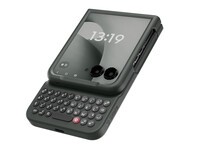
Clicks Keyboard transforms the new Motorola Razr Ultra
Clicks Technology today introduced a new Clicks Keyboard for the new 2025 Motorola Razr Ultra. Beyond offering a premium typing experience, Clicks elevates Razr into a pocketable productivity powerhouse by transforming the possibilities for the external display through a real physical keyboard.

Meet Clicks for Razr: A keyboard you’ll flip for.
Clicks for the Motorola Razr transforms the foldable experience — unlocking full-screen productivity while keeping Razr ultra-pocketable. Best of all, Clicks adds a real keyboard that lets you type, navigate, and take control — all from the external display.
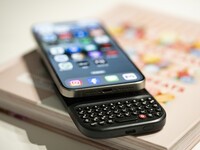
The Power User's Guide For The Clicks Power Keyboard
The Clicks Power Keyboard is a command center for your whole tech ecosystem. And once you push past the basics of typing, to get the most out of your Power Keys, try these tips and tricks!

How to Use Clicks Power Keyboard Across Your Gadgets
Treating the Power Keyboard solely as a phone accessory leaves its best capabilities on the table. This guide will share some ways users have told us they now count on Power Keyboard for their whole tech ecosystem.