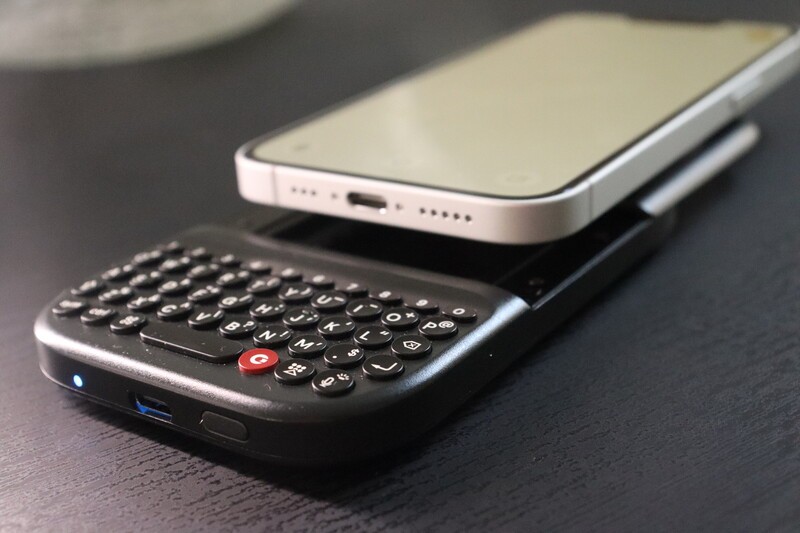
Technology should adapt to your needs, not the other way around. That's why we're so excited about reclaiming screen real estate and bringing back the tactile precision of a physical keyboard.
Since iPhone 14, Clicks has had a physical keyboard available for iPhone models as they've been released. But how do we keep up with this as there are slight variations between sizing and functionality between slightly different models and slightly different versions (like iPhone 17e)? That's where our latest product, the Clicks Power Keyboard shines. It expands compatibility beyond anyything we've ever done with any Clicks product ever before.
With the launch of the Clicks Power Keyboard, we are extending that mission to a far broader ecosystem of devices, including Apple's latest entry-level smartphone, the iPhone 17e.
If you are an iPhone 17e user and you're wondering if you can finally get the precision and speed of a physical QWERTY layout on your smartphone, the answer is absolutely!
Here is everything you need to know about how these two devices work together.
Native Precision: The MagSafe Connection
The Clicks Power Keyboard is designed to be universal and pocketable. Unlike our original iPhone cases that wrapped around the device, the Power Keyboard attaches to smartphones using a high-strength MagSafe or Qi2 magnetic connection.
For the iPhone 17e community, this is a significant upgrade. While previous "e" series models (like the iPhone 16e) lacked internal magnets, the iPhone 17e features native MagSafe support. This means the Power Keyboard will snap directly onto the back of your phone with perfect alignment, no extra hardware required.
iPhone Compatibility Table
The Power Keyboard is a versatile tool that functions as both a Bluetooth keyboard and a wireless power bank. Here is how it integrates across the iPhone line-up:
| iPhone Model | Native Magnetic Attachment? | Wireless Charging Support? | Keyboard Functionality? |
|---|---|---|---|
| iPhone 17 / Pro / Pro Max / Air | Yes (Native Qi2) | Yes | Yes |
| iPhone 17e | Yes (Native MagSafe) | Yes | Yes |
| iPhone 16 / Pro / Pro Max / Plus | Yes (Native MagSafe) | Yes | Yes |
| iPhone 16e | Via MagSafe Case/Ring | Yes | Yes |
| iPhone 15 / 14 / 13 / 12 Series | Yes (Native MagSafe) | Yes | Yes |
| iPhone SE (3rd Gen) | Via MagSafe Case/Ring | Yes | Yes |
| iPhone 13 Mini / 12 Mini | Yes (Native MagSafe) | Yes | Yes |
Pro Tip: The Power Keyboard features three slider positions. While Position 1 is perfect for most standard iPhones, Position 2 or 3 provides the ideal balance for larger models like the iPhone 17 Pro Max or the ultra-thin iPhone 17 Air. For the iPhone 17e, most users will probably want the keyboard in Position 1.
More Than Just a Keyboard: Power Your iPhone 17e
The "Power" in Power Keyboard comes from its integrated 2,300 mAh battery. When your iPhone 17e is magnetically attached, the keyboard acts as a functional wireless power bank.
- Wireless "Top-Up": Use the Clicks App to manage your power. You can set the keyboard to wirelessly charge your iPhone or reserve that energy strictly for typing to ensure you never run out of "clicks."
- Landscape Productivity: Rotate your iPhone 17e to landscape and slide the keyboard out. This creates a "mini-laptop" experience that is perfect for editing documents or navigating complex spreadsheets without an on-screen keyboard blocking your view.
- Multi-Device Flow: The Power Keyboard supports three Bluetooth profiles. You can stay paired with your iPhone 17e, your iPad, and even your Apple TV simultaneously, switching between them with a quick keyboard shortcut (Power + 1, 2, or 3).
Experience Consistent, Confident Typing
Whether you're working your way through emails on a flight or drafting scripts in a café, the Clicks Power Keyboard brings a consistent, confident typing experience to your iPhone 17e.
By moving the keyboard off the glass and into your hands, you finally get to see 100% of that beautiful 6.1-inch display. It's time to stop pecking at glass and start typing with intention.
Read more
The Power User's Guide For The Clicks Power Keyboard
The Clicks Power Keyboard is a command center for your whole tech ecosystem. And once you push past the basics of typing, to get the most out of your Power Keys, try these tips and tricks!
How to Use Clicks Power Keyboard Across Your Gadgets
Treating the Power Keyboard solely as a phone accessory leaves its best capabilities on the table. This guide will share some ways users have told us they now count on Power Keyboard for their whole tech ecosystem.

What is ‘premium’? It’s more than meets the eye.
Everything about Clicks Communicator has been designed to deliver a premium communication experience from the inside, out.
Introducing the Communicator Ring
Communicator Ring is a minimalist bumper case that gives Clicks Communicator an added layer of protection while complementing its design.