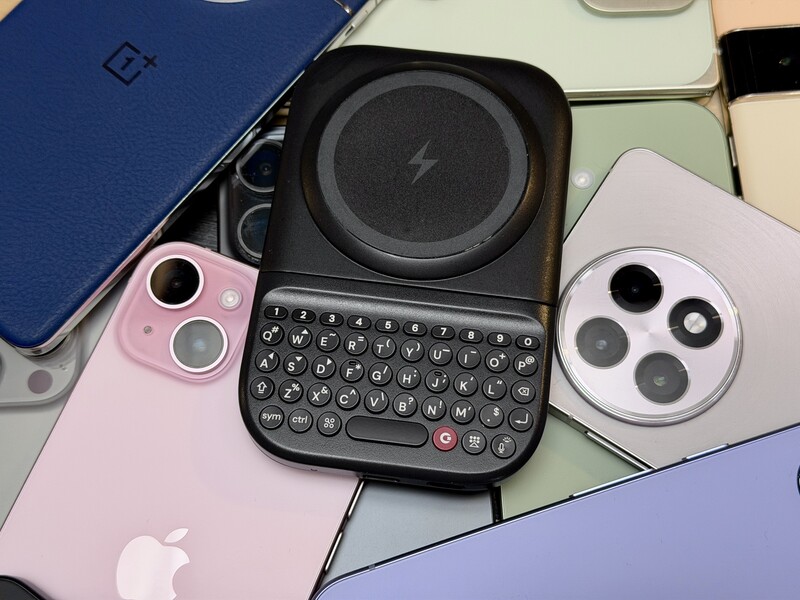
One of the most frequent questions we receive is whether the new Clicks Power Keyboard will fit a specific phone model.
While our original keyboard cases were precision-engineered for specific flagship models.
The Power Keyboard marks a significant shift toward universal, cross-device compatibility.
Because Power Keys uses a magnetic attachment system rather than a wrap-around case, the Power Keyboard is designed to work with many across the mobile ecosystem. Will it work with your phone? Chances are yes!
But depending on the model and make, your phone may require a special case to tap into both the magnetic connection and the wireless charging capabilities of the Clicks Power Keyboard.
Magnetic Compatibility: MagSafe & Qi2
People sometimes throw around the terms MagSafe and Qi (or Qi2) interchangeably. But actually there's an important nuance.
Not every phone that charges wirelessly (Qi or Qi2) has a magnet ring for attaching accessories (like the Power Keyboard). Before you look at the master compatibility chart, take a quick glance at this one first to understand the differences between MagSafe, Qi2, and Native Magnet support.
| Feature | MagSafe | Qi2 | Native Magnet Support |
|---|---|---|---|
| Origin | Apple proprietary (introduced with iPhone 12). | Global open standard. | Built-in magnetic hardware within the phone chassis. |
| Max Power | Up to 15W (25W on iPhone 16+ with specific gear). | Up to 15W standard (future versions aim higher including 25W). | N/A (refer to your specific phone). |
| Alignment | Ring of precision magnets around the charging coil. | Standardized "Magnetic Power Profile" for charging devices. | Critical for holding the Power Keyboard in place. |
Now that you're armed with that knowledge, take a look at the table below to see if your phone is optimized for both wireless charging with the Clicks Power Keyboard and a magnetic connection. If it doesn't have a native magnet, you'll need to find a magnetic case for your phone's model.
| Phone Model | Wireless Protocol | Native Magnet? | Requires Magnetic Case |
|---|---|---|---|
| iPhone 17, Pro, Pro Max | MagSafe / Qi2 | YES | NO |
| iPhone Air | MagSafe / Qi2 | YES | NO |
| iPhone 13, 14, 15, 16 Series | MagSafe / Qi2* | YES | NO |
| iPhone 12 Series | MagSafe / Qi2* | YES | NO |
| iPhone 16e | Qi | NO | YES |
| Pixel 10, 10 Pro, 10 Pro XL | Qi2 | YES | NO |
| Pixel 10 Pro Fold | Qi2 | YES | NO |
| Pixel 9, 9 Pro, 9 Pro XL | Qi | NO | YES |
| Pixel 6, 7, 8 (all variants) | Qi | NO | YES |
| Samsung Galaxy S25 Series | Qi / Qi2 Ready** | NO | YES |
| Samsung Galaxy S22 – S24 Series | Qi | NO | YES |
| Samsung Galaxy Z Fold Series | Qi | NO | YES |
| OnePlus 15 | Qi / Magnetic Ready*** | NO | YES |
| OnePlus 15R | Qi / Magnetic Ready*** | NO | YES |
| OnePlus 13 | Qi / Magnetic Ready*** | NO | YES |
| OnePlus 13R | Qi / Magnetic Ready*** | NO | YES |
| OnePlus 12 | Qi | NO | YES |
Technical Notes:
- * iPhone 12-14 models support the Qi2 protocol via software updates, while maintaining their native MagSafe magnets.
- ** Samsung Galaxy S25 is "Qi2 Ready," supporting the protocol but lacking internal magnets. A magnetic case is essential to provide the physical "snap."
- *** OnePlus devices supports 50W magnetic wireless charging through a specialized magnetic case ecosystem.
No case? No problem!
There's also the option of putting a magnetic ring sticker on the back of your phone. This would allow you to connect your phone to the Power Keys magnet array, but will not allow your phone to charge from the battery built into the Power Keyboard.
This is probably more than you thought you needed to know, but since the Power Keyboard magnetically attaches and wirelessly charges, it's important to make sure your phone is compatible for both, just so you have the experience you're expecting.
Why Alignment Matters for Charging
The Power Keyboard doesn't just type; it includes a 2,300 mAh battery that wirelessly tops up your phone. The magnetic connection is what ensures the charging coils in the keyboard and your phone are perfectly aligned.
- Efficiency: Proper magnetic alignment reduces energy waste and heat, leading to faster charging.
- Reliability: Without magnets, a phone can easily slip off the "sweet spot" during use, causing charging to stop.
- The Case Impact: Using a case that is too thick or lacks magnets can interfere with the electromagnetic field, significantly slowing down power transfer or preventing it entirely.
One Slider, Every Size
To ensure a perfect ergonomic fit, the Power Keyboard features a slide-out keyboard with a multi-position slider. This allows the hardware to adapt physically to the dimensions of your phone:
- Standard Position: Optimized for base flagship models like the iPhone 17 or Pixel 10.
- Extended Position: Adjusts to accommodate larger "Ultra" and "Pro Max" sized phones.
- Landscape Rotation: Enables the keyboard to be used in a wide-screen orientation, perfect for editing spreadsheets and long-form emails.
Connectivity Beyond the Magnet
The Power Keyboard connects via Bluetooth, allowing it to transcend being "just a phone accessory". Because it doesn't rely on a physical port, it is compatible with:
- Tablets: Ideal for working on a plane or at a café without the bulk of a full-size keyboard case.
- Smart TVs: Replaces cumbersome on-screen remotes for Apple TV and other connected screens.
- AR/VR Headsets: Delivers tactile feedback for purposeful use in environments like Apple Vision Pro.
Multi-Device Mastery
You can pair the Power Keyboard with up to three different devices simultaneously. Using a simple keyboard shortcut, you can move effortlessly from typing a text on your phone to entering a password on your TV.
Read more
Samsung's Phones Don't Have Magnets But You Can Still Use Power Keys
The Clicks Power Keyboard relies on a high-strength magnetic connection to "snap" onto the back of your smartphone. While this is a native feature for some devices, Samsung Galaxy phones just refuse to adopt this feature. Having a built-in magnetic ring in the chassis is standard with many other phones, but not galaxy devices. At least not as of 2026. Having no magnetic ring on...
Clicks Power Keyboard: The Samsung Galaxy Compatibility Guide (2021–2026)
One of the most frequent questions we get at Clicks is: "Will it fit my phone?" With the launch of the Clicks Power Keyboard, the answer is almost certainly yes. Unlike our original case-style keyboards, the Power Keyboard uses a universal magnetic slider. This means that as long as your phone has a way to attach to a magnet (built-in, through a compatible case, or by adding a magnetic...
The Samsung Users' Guide to Clicks Power Keyboard
For years, the Samsung Galaxy experience has involved a silent trade-off. We gained some of the most stunning mobile displays in the world, but we keep losing that real estate to the digital keyboard any time we try and get stuff done. The moment you need to reply to a Slack message or draft an email, that virtual keyboard slides up and consumes nearly half of that beautiful Infinity...

Users’ Guide for Clicks Power Keyboard with Meta Quest
Spatial computing and the metaverse have fundamentally changed how we visualize our digital lives, but actually interacting with those worlds can still feel like a step backward. To transform your Meta Quest from a gaming headset into a true productivity engine, you need to look back to a classic tool: the physical keyboard. While the Meta Quest series, from the Quest 3 to the...