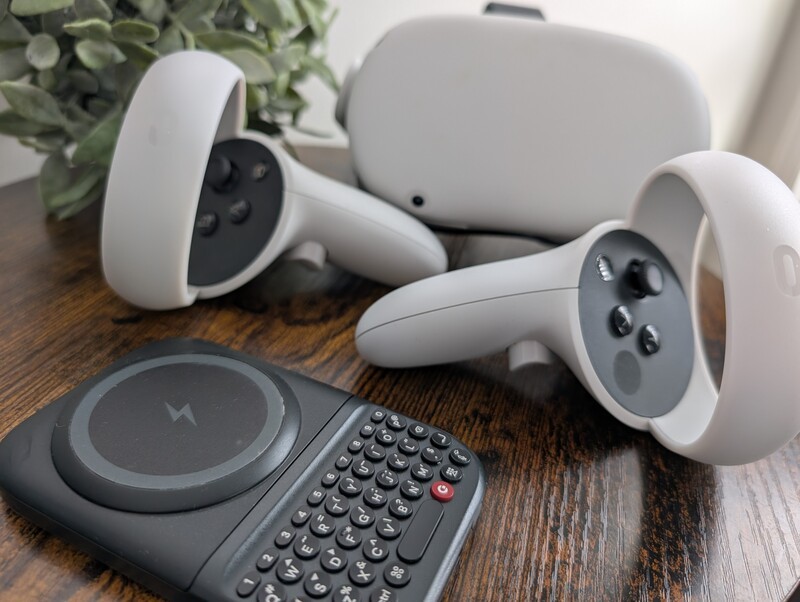
Spatial computing and the metaverse have fundamentally changed how we visualize our digital lives, but actually interacting with those worlds can still feel like a step backward.
To transform your Meta Quest from a gaming headset into a true productivity engine, you need to look back to a classic tool: the physical keyboard.
While the Meta Quest series, from the Quest 3 to the Quest Pro, offers an expansive virtual workspace, it remains tethered to a significant hurdle: a fast, reliable way to input text.
The Input Barrier in VR
Input is often the most frustrating part of the VR experience. When you're inside the headset, you're usually limited to two native options for entering text:
- The Virtual "Point and Click": Using your Quest controllers to point at a floating keyboard and clicking one letter at a time.
- Direct Touch Typing: Reaching out into empty space to "tap" virtual keys that have no physical presence.
In practice, these methods are slow, error-prone, and break your flow state. This friction often forces users to treat their headsets as passive entertainment devices rather than the powerful computers they actually are.
Tactile Precision in a Virtual Space
The Clicks Power Keyboard offers a more sophisticated way to work. As a compact, pocket-sized keyboard that connects via Bluetooth, it delivers a high-performance, tactile typing experience directly into your immersive environment.
Seamless Pairing
Getting started is simple. Navigate to the Bluetooth settings within your Quest's experimental or system menus.
Hold down the Power Button on your Clicks Keyboard and the number on the keyboard you'd like to pair your VR headset to (1-9).
Then select the Clicks Power Keyboard as the Bluetooth source on your Meta Quest.
Once paired, the Power Keyboard is ready to tackle any text field that appears in your virtual view.
The Passthrough Advantage
Because the Meta Quest features advanced color passthrough, you don't have to choose between your virtual world and your physical tools. You can clearly see the Power Keyboard in your hands while you work, allowing for confident "touch-typing" with the satisfying physical feedback of real keys.
Built for the Mobile Professional
The Clicks Power Keyboard isn't just for smartphones. It's a universal tool designed to bring intentionality to every smart screen you own.
- Ergonomic Precision: Our keys are sculpted with optimized pressure, ensuring every keystroke feels purposeful and accurate.
- Dedicated Number Row: We've included a full row for numbers, making it easy to enter complex passwords or manage data in spreadsheets without hunting through symbol menus.
- Adjustable Backlighting: If you're working in a dark room to improve your headset's tracking or flying on a dim overnight flight, the adjustable backlight ensures your keys are always visible.
- Ultra-Portable Design: The Power Keyboard is small enough to fit in your pocket, making it the perfect companion for a portable VR workstation.
Why Not Just Use a Laptop?
Many users attempt to bridge the input gap by using remote desktop apps to see their computer screen inside the Quest. While this works at a desk, it requires you to lug around a full laptop—defeating the goal of a lightweight, mobile set-up.
If you're working in a cramped airplane seat or at a small table in a café, a full-size laptop is overkill. The Power Keyboard provides the same physical speed in a fraction of the space, turning your Quest into a truly standalone productivity tool.
The Power of Versatility
The Clicks Power Keyboard is thoughtfully designed to live across your entire ecosystem. With support for three Bluetooth profiles, you can move from typing a message on your Google Pixel or iPhone to drafting a document in your Quest with a simple shortcut.
Whether you're working your way through emails on your smartphone or iPad, searching for content on your Apple TV, or building a new world in VR, the Power Keyboard brings a level of speed and intention to every task. It turns your headset into a precision instrument for action, no matter which reality you're working in.
Read more
Samsung's Phones Don't Have Magnets But You Can Still Use Power Keys
The Clicks Power Keyboard relies on a high-strength magnetic connection to "snap" onto the back of your smartphone. While this is a native feature for some devices, Samsung Galaxy phones just refuse to adopt this feature. Having a built-in magnetic ring in the chassis is standard with many other phones, but not galaxy devices. At least not as of 2026. Having no magnetic ring on...

Which Phones is the Clicks Power Keyboard Compatible With?
One of the most frequent questions we receive is whether the new Clicks Power Keyboard will fit a specific phone model. While our original keyboard cases were precision-engineered for specific flagship models. The Power Keyboard marks a significant shift toward universal, cross-device compatibility. Because Power Keys uses a magnetic attachment system rather than a wrap-around...
Clicks Power Keyboard: The Samsung Galaxy Compatibility Guide (2021–2026)
One of the most frequent questions we get at Clicks is: "Will it fit my phone?" With the launch of the Clicks Power Keyboard, the answer is almost certainly yes. Unlike our original case-style keyboards, the Power Keyboard uses a universal magnetic slider. This means that as long as your phone has a way to attach to a magnet (built-in, through a compatible case, or by adding a magnetic...
The Samsung Users' Guide to Clicks Power Keyboard
For years, the Samsung Galaxy experience has involved a silent trade-off. We gained some of the most stunning mobile displays in the world, but we keep losing that real estate to the digital keyboard any time we try and get stuff done. The moment you need to reply to a Slack message or draft an email, that virtual keyboard slides up and consumes nearly half of that beautiful Infinity...