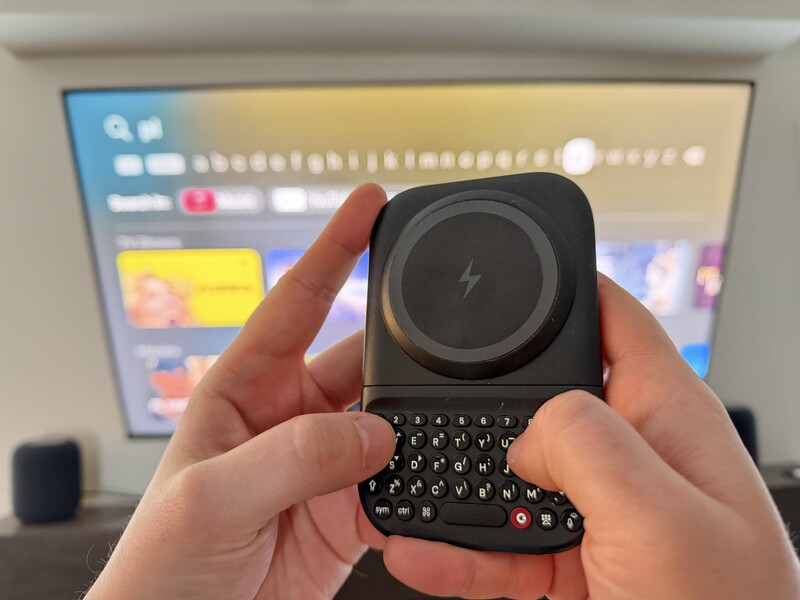
Picture this! You settled on the couch, dimmed the lights, and picked out a movie, only to be met with a "Sign In" screen because you didn't realize your favourite streaming app on Apple TV just logged you out. Using a traditional remote to hunt-and-peck through an on-screen alphabet is the antithesis of a premium entertainment experience.
The tasty pizza you ordered to go with your movie is getting cold while you try and remember how to find the "~" symbol on the on-screen keyboard.
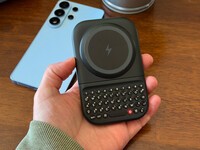
The Clicks Power Keyboard was designed to solve exactly this kind of digital friction. The Siri remote is great and some things, but it can be slow, easy to make a mistake, and if you did what you're supposed to and chose a complicated password with symbols and numbers, good luck typing that out one character at a time!
While it is a powerhouse for smartphone productivity, its ability to bridge the gap between your pocket and your living room makes it an essential tool for the modern smart home.
Why a Keyboard for Your Apple TV?
The Apple TV is a slick gateway to a massive ecosystem of content, but navigating that ecosystem requires more input than a simple "Play" button can provide.
- Searching with Precision: Whether you are looking for a niche documentary or a specific YouTube creator, typing is objectively faster than scrolling through a linear list of letters.
- The Password Hurdle: Entering complex passwords—complete with symbols, capital letters, and numbers—is a nightmare on a standard remote. With the Power Keyboard's dedicated number row and tactile feedback, you can enter credentials with total confidence.
- Navigate Like Nothing: Pro tip: you can get the same effect as the Siri Remote's D-Pad on Clicks. Just hold the symbol key (SYM) or give it a double press to keep it "locked" on the Power Keyboard and use the arrows to select shows, scroll between apps, and navigate your screen. Press enter to make a selection.
The Remote Dilemma: Why the Siri Remote Isn't Enough
The Apple TV remote is a marvel of design for navigation, but it was never intended for heavy data entry. While voice dictation exists, it often struggles with non-dictionary words, unique usernames, or complex passwords. Speaking your password out loud isn't just unintuitive, it's somewhere between embarrassing and a privacy risk if you have guests or in-laws nearby. The Power Keyboard provides a silent, private, and precise alternative that stays tucked in your pocket or on the coffee table until the moment you need it.
iPhone Input vs. Tactile Keys
Apple does offer a software solution: when you enter a text field, your iPhone can prompt you to use its virtual keyboard. However, this relies on your phone being in your hand and the notification appearing instantly. If your phone is charging in another room or you are trying to minimize "doomscrolling" distractions during movie night, this "solution" becomes another hurdle. Furthermore, typing on a glass screen still leads to the occasional typo. The ergonomically shaped keys of the Power Keyboard ensure that when you press a key, you know you've hit it, reducing the "backspace-and-retry" loop that plagues virtual typing.
How to Get Started
Setting up your Power Keyboard with an Apple TV is as simple as any other Bluetooth accessory.
- Navigate to Settings > Remotes and Devices > Bluetooth on your Apple TV.
- On your Power Keyboard, use the Bluetooth profile shortcut to enter pairing mode.
- Select "Clicks Power Keyboard" when it appears on your TV screen.
Because the Power Keyboard can be paired with multiple devices simultaneously, you can switch from typing a text on your iPhone to entering a search query on your Apple TV with a single keyboard shortcut.
Can It Replace Your Remote?
The Power Keyboard excels at navigation. You can use the directional keys to move between apps and shows, and the Enter key to make selections. For many users, this is enough to browse a library and start a show.
However, the Power Keyboard is a companion, not a total replacement. It does not currently support Apple TV's proprietary volume control (CEC) or the global "Home" button. For the best experience, we recommend using the two tools in parallel: use the Siri Remote for volume and quick exits, and reach for the Power Keyboard the moment a text field appears.
A Universal Control Always In Your Pocket
The Clicks Power Keyboard is a bit of a shift in how people generally think about their devices. It is a single, pocketable tool that brings a consistent typing experience to your entire ecosystem. While it transforms the Apple TV experience, the same hardware is ready to tackle much more.
The integrated 2,300 mAh battery ensures that whether you are wirelessly topping up your iPhone or pairing with a tablet at a café, you always have the power to stay productive. From entering commands in an AR/VR environment to managing spreadsheets on an iPad, the Power Keyboard is the definitive way to reclaim your time and command over your screens.
Read more
Samsung's Phones Don't Have Magnets But You Can Still Use Power Keys
The Clicks Power Keyboard relies on a high-strength magnetic connection to "snap" onto the back of your smartphone. While this is a native feature for some devices, Samsung Galaxy phones just refuse to adopt this feature. Having a built-in magnetic ring in the chassis is standard with many other phones, but not galaxy devices. At least not as of 2026. Having no magnetic ring on...
Which Phones is the Clicks Power Keyboard Compatible With?
One of the most frequent questions we receive is whether the new Clicks Power Keyboard will fit a specific phone model. While our original keyboard cases were precision-engineered for specific flagship models. The Power Keyboard marks a significant shift toward universal, cross-device compatibility. Because Power Keys uses a magnetic attachment system rather than a wrap-around...
Clicks Power Keyboard: The Samsung Galaxy Compatibility Guide (2021–2026)
One of the most frequent questions we get at Clicks is: "Will it fit my phone?" With the launch of the Clicks Power Keyboard, the answer is almost certainly yes. Unlike our original case-style keyboards, the Power Keyboard uses a universal magnetic slider. This means that as long as your phone has a way to attach to a magnet (built-in, through a compatible case, or by adding a magnetic...
The Samsung Users' Guide to Clicks Power Keyboard
For years, the Samsung Galaxy experience has involved a silent trade-off. We gained some of the most stunning mobile displays in the world, but we keep losing that real estate to the digital keyboard any time we try and get stuff done. The moment you need to reply to a Slack message or draft an email, that virtual keyboard slides up and consumes nearly half of that beautiful Infinity...