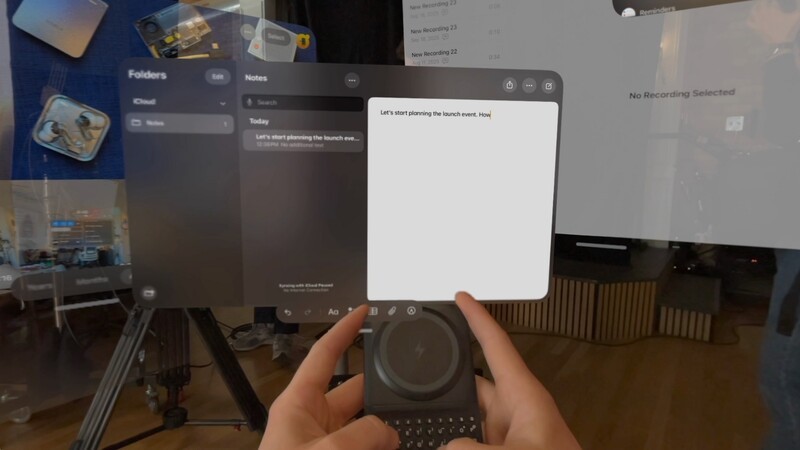
Spatial computing has redefined how we see our work, but for many, it has also complicated how we actually do it. To make this cutting edge piece of tech into a productivity powerhouse, we need to kick it old school with one of the original PC accessories - the keyboard.
While the Apple Vision Pro offers an immersive canvas like no other, it is held back by a fundamental missing piece: a fast, reliable way to type.
The Input Barrier in Spatial Computing
Input has consistently been one of the primary drawbacks of the Vision Pro experience. Currently, users are left with two main native options for entering text:
- Virtual "Pecking": You can poke at a floating virtual keyboard that you can see but never feel and you certainly never get into a flow state for speed like you do with physical keys.
- Gaze and Pinch: You can use eye tracking to highlight a letter and then tap your fingers together to select it.
In practice, both methods are slow, prone to error, and deeply frustrating for anyone trying to get real work done. This friction makes it difficult to use the Vision Pro for serious productivity or content creation, often relegating a $3,500 device to a high-end personal theater.
Tactile Typing for the Virtual World
Clicks Power Keyboard offers a more elegant solution. As a compact Bluetooth keyboard, it brings high-performance, tactile typing directly into your virtual environment without the bulk of a laptop or a desktop keyboard.
Seamless Integration
Pairing is effortless via the Bluetooth menu in visionOS. Once connected, any time a text field appears in your virtual space, you can reach for Power Keyboard to tackle the task. Because you can still see the keyboard in your hands through the Vision Pro's passthrough, you get the best of both worlds: the ability to "touch-type" with real, satisfying tactile feedback and the visual confirmation of your hands in space.
Designed for Power Users
Power users aren't just using the Clicks Power Keyboard for their smartphone. They're finding more and more devices around their home that can benefit from the sculpted keys and fast but precise typing experience.
- Backlit Keys: Whether you're working in a darkened room or a dimly lit cabin on a red-eye flight, adjustable backlighting ensures you never lose your place.
- Dedicated Number Row: We've included a dedicated row for numbers, making data entry and spreadsheet editing just as fast as they are on a desktop. It's also great for inputting complex passwords.
- Pocketable Productivity: Power Keyboard is designed to be small and lightweight. You can dial in your productivity without having to lug around a 10-finger keyboard or a laptop bag.
Why Not Just Use a MacBook?
One common workaround people use for the Vision Pro's lack of a physical keyboard is using the Mac Virtual Display feature. This allows you to use your Mac's physical keyboard as input, but it comes with a major catch: you have to carry your MacBook everywhere.
This "two-device" requirement works well at a desk or in a home office, but it fails in the very environments where spatial computing should shine. If you are working in the tight confines of an airplane or at a crowded café, pulling out a full laptop just to type a few emails in VR defeats the purpose of a portable spatial workstation.
The Versatility of Power Keys
The Power Keyboard is a fantastic tool to work across your smart ecosystem. Its ability to pair with up to three devices simultaneously means you can move from typing on your iPhone to replying on your Vision Pro with a simple shortcut.
Whether you are "reclaiming your screen" on an Android phone, triaging emails on an iPad, or entering passwords on a Smart TV, Power Keys brings a level of intention and speed to every smart device you own. It turns your technology into a precision instrument for action, no matter which dimension you're working in.
Read more
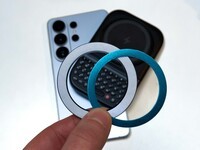
Samsung's Phones Don't Have Magnets But You Can Still Use Power Keys
The Clicks Power Keyboard relies on a high-strength magnetic connection to "snap" onto the back of your smartphone. While this is a native feature for some devices, Samsung Galaxy phones just refuse to adopt this feature. Having a built-in magnetic ring in the chassis is standard with many other phones, but not galaxy devices. At least not as of 2026. Having no magnetic ring on...
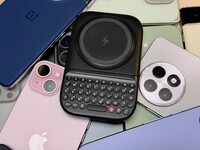
Which Phones is the Clicks Power Keyboard Compatible With?
One of the most frequent questions we receive is whether the new Clicks Power Keyboard will fit a specific phone model. While our original keyboard cases were precision-engineered for specific flagship models. The Power Keyboard marks a significant shift toward universal, cross-device compatibility. Because Power Keys uses a magnetic attachment system rather than a wrap-around...
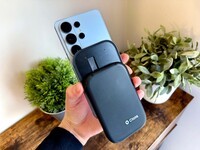
Clicks Power Keyboard: The Samsung Galaxy Compatibility Guide (2021–2026)
One of the most frequent questions we get at Clicks is: "Will it fit my phone?" With the launch of the Clicks Power Keyboard, the answer is almost certainly yes. Unlike our original case-style keyboards, the Power Keyboard uses a universal magnetic slider. This means that as long as your phone has a way to attach to a magnet (built-in, through a compatible case, or by adding a magnetic...
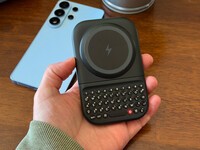
The Samsung Users' Guide to Clicks Power Keyboard
For years, the Samsung Galaxy experience has involved a silent trade-off. We gained some of the most stunning mobile displays in the world, but we keep losing that real estate to the digital keyboard any time we try and get stuff done. The moment you need to reply to a Slack message or draft an email, that virtual keyboard slides up and consumes nearly half of that beautiful Infinity...