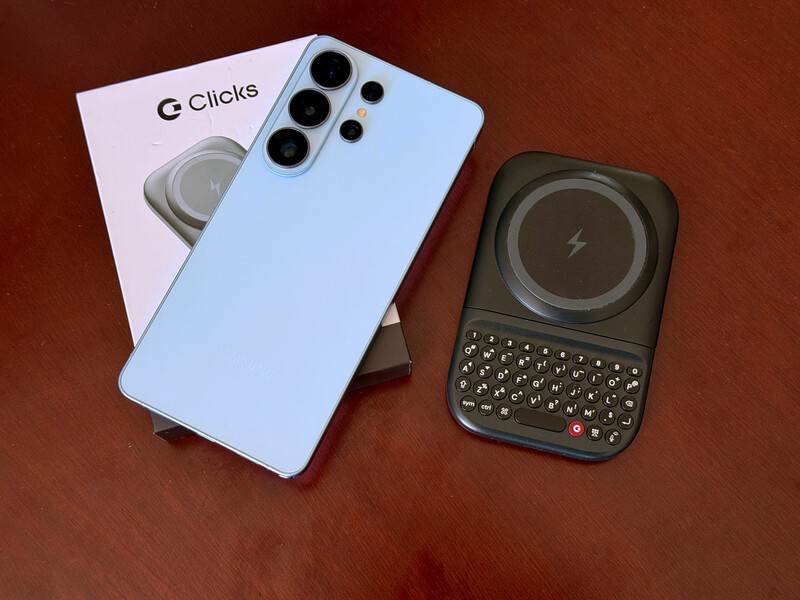
The Samsung Galaxy S26 series represents the absolute pinnacle of mobile processing and display technology.
These are devices meant for Power Users who want a no-compromise flagship phone experience.
But even the most powerful processor can't fix the frustration of a virtual keyboard that covers your work. That is why the Clicks Power Keyboard is the essential accessory for the S26 generation.
Which Clicks keyboard works with Samsung Galaxy Smartphones?
While we have bespoke case solutions for many iPhone models, the Pixel 9 & 10, and even the Motorola Razr and Razr Ultra, Samsung users will be turning to our flagship universal keyboard option, the Clicks Power Keyboard.
The S26 series is designed for creators and professionals who live in their "flow state". When you snap the Power Keyboard to the back of your magnetic case, you're going to be editing videos or triaging an inbox as productively as you would on your laptop.
By offloading the input from the digital keyboard to the Clicks Power Keyboard's physical QWERTY layout, you reclaim 50% of the S26's screen. Suddenly, you're not typing on top of your projects anymore, you're typing below them.
Future-Proof Productivity
The Power Keyboard was built to complement the S26's advanced features. With Bluetooth 5.4, the connection is virtually lag-free, providing the instant tactile feedback that professionals require.
- The S26 Ultra Experience: Use the Position 3 slider to balance the Ultra's large frame. The ergonomically contoured keys are spaced to prevent typos, making long-form writing on the go a reality.
- Emergency Power: The S26 lineup is efficient, but a long day of work can still drain your battery. The Power Keyboard's integrated 2,300 mAh battery acts as a perfect emergency reserve, providing a wireless top-up to your S26 while you type.
- Galaxy Compatibility: And while we're pumping up the tires of Samsung's latest flagship, don't worry. If you pair previous generation galaxy devices that support wireless charging with a magnetic case, you'll be able to enjoy all the benefits of the Clicks Power Keyboard.
Master Your Galaxy
Whether your digital galaxy is filled exclusively with Samsung devices or you table across ecosystems with an Apple Vision Pro or an iPad added to the mix, you'll get the most out of your Clicks Power Keyboard.
That's because you can pair up to three devices to your Power Keys and switch quickly between those profiles.
Whether you're on your galaxy smartphone, your favorite tablet, or even a TV streaming box, VR headset, or a game console, you'll be able to take advantage of what could very well be the world's most handy pocketable keyboard!
Read more
Samsung's Phones Don't Have Magnets But You Can Still Use Power Keys
The Clicks Power Keyboard relies on a high-strength magnetic connection to "snap" onto the back of your smartphone. While this is a native feature for some devices, Samsung Galaxy phones just refuse to adopt this feature. Having a built-in magnetic ring in the chassis is standard with many other phones, but not galaxy devices. At least not as of 2026. Having no magnetic ring on...
Which Phones is the Clicks Power Keyboard Compatible With?
One of the most frequent questions we receive is whether the new Clicks Power Keyboard will fit a specific phone model. While our original keyboard cases were precision-engineered for specific flagship models. The Power Keyboard marks a significant shift toward universal, cross-device compatibility. Because Power Keys uses a magnetic attachment system rather than a wrap-around...
Clicks Power Keyboard: The Samsung Galaxy Compatibility Guide (2021–2026)
One of the most frequent questions we get at Clicks is: "Will it fit my phone?" With the launch of the Clicks Power Keyboard, the answer is almost certainly yes. Unlike our original case-style keyboards, the Power Keyboard uses a universal magnetic slider. This means that as long as your phone has a way to attach to a magnet (built-in, through a compatible case, or by adding a magnetic...
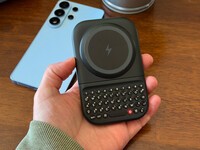
The Samsung Users' Guide to Clicks Power Keyboard
For years, the Samsung Galaxy experience has involved a silent trade-off. We gained some of the most stunning mobile displays in the world, but we keep losing that real estate to the digital keyboard any time we try and get stuff done. The moment you need to reply to a Slack message or draft an email, that virtual keyboard slides up and consumes nearly half of that beautiful Infinity...