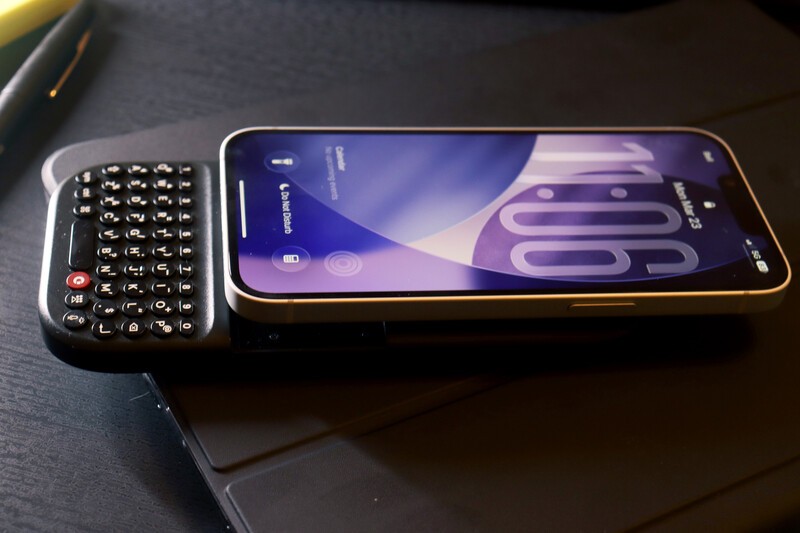
Your most important tool should never get in the way of your ideas. The iPhone 17e represents a perfect balance of performance and portability and price, being the lowest cost iPhone in the lineup.
But, like all modern smartphones, the on-screen keyboard still takes up nearly half of your display. The Clicks Power Keyboard changes that.
By moving typing off the glass and into a tactile, physical QWERTY layout, you reclaim 100% of your screen for your content and work. Whether you are triaging a heavy inbox or drafting a thread on the move, this guide will help you master your new set-up.
The Snap: Physical Set-up
The Power Keyboard is a universal tool that uses a high-strength magnetic connection to stay secure while you work.
- MagSafe Alignment: The iPhone 17e features native MagSafe support (an improvement from last year's 16e). Simply align the back of your phone with the magnetic array on the Power Keyboard for an instant, secure bond.
- Case Compatibility: If you prefer using a case, ensure it is MagSafe-compatible to maintain a strong physical connection.
- The Slider: The Power Keyboard features an adjustable slider. For the iPhone 17e, we recommend Position 1 for the most compact and balanced feel in your hands.
Getting Connected
The Power Keyboard communicates with your iPhone 17e via Bluetooth, allowing for a cable-free experience and the ability to switch between multiple devices.
- Enter Pairing Mode: While holding down the power key, also press down on the number key that you'd like to pair your device to (1-9)
- Select Clicks: On your iPhone, go to Settings > Bluetooth and select Clicks Power Keyboard.
- Multi-Device Switch: You can pair up to three devices at once. To switch from your iPhone to an iPad or Mac, simply press the Power button on the bottom of the keyboard followed by the 1, 2, or 3 key.
The Power Keyboard is an excellent companion for your phone because it's also a universal tool for any smart screen:
- Tablets: Pair it with your tablet for a lightweight typing solution that beats the bulk of a full-size keyboard case.
- Smart TVs: Stop struggling with clunky remotes; use Power Keyboard to type in passwords and search for content on your TV.
- AR/VR & Gaming: In immersive environments where virtual keyboards are frustrating, Power Keyboard provides the tactile feedback needed for purposeful interaction.
You can even pair it with up to three devices simultaneously, switching between your phone, tablet, and TV with a simple keyboard shortcut.
Essential iOS Shortcuts
One of the greatest advantages of a physical keyboard is the ability to tap into the Power User shortcuts that are already build into the phone's operating system. These allow you to navigate iOS without ever touching the screen.
- CMD + Space: Open Spotlight Search from anywhere.
- CMD + H: Return to the Home Screen.
- CMD + Tab: Quickly switch between your recently used apps.
- CMD + N: Start a new email in Mail or a new message in Messages.
- Spacebar: Scroll down through webpages in your browser or documents in Notes.
Power Management: Wireless Top-Up
As an added bonus, you're not just getting a keyboard with Power Keys, you're getting peace-of-mind and no more battery life anxiety. The Clicks Power Keyboar is also a functional power bank. When your iPhone 17e is magnetically attached, it can wirelessly top up your phone's battery.
While you're on the go, the Clicks Power Keyboard keeps your phone battery charged. When you're back at your desk, simply plug a USB-C cable into the port at the bottom of the Clicks Power Keyboard to charge both the keyboard and your phone simultaneously.
Elevate Your Flow
The iPhone 17e is a solid choice for people who want a simple, straight-forward iPhone experience. It strips away some of the bells and whistles (like camera control) which might make the iPhone needlessly complicated.
When adding a Clicks Power Keyboard to iPhone 17 e, it's a game-changer. By providing a dedicated space for action by removing that digital keyboard, it allows you to stay focused and productive in a noisy digital world.
Read more
The Power User's Guide For The Clicks Power Keyboard
The Clicks Power Keyboard is a command center for your whole tech ecosystem. And once you push past the basics of typing, to get the most out of your Power Keys, try these tips and tricks!
How to Use Clicks Power Keyboard Across Your Gadgets
Treating the Power Keyboard solely as a phone accessory leaves its best capabilities on the table. This guide will share some ways users have told us they now count on Power Keyboard for their whole tech ecosystem.

What is ‘premium’? It’s more than meets the eye.
Everything about Clicks Communicator has been designed to deliver a premium communication experience from the inside, out.
Introducing the Communicator Ring
Communicator Ring is a minimalist bumper case that gives Clicks Communicator an added layer of protection while complementing its design.