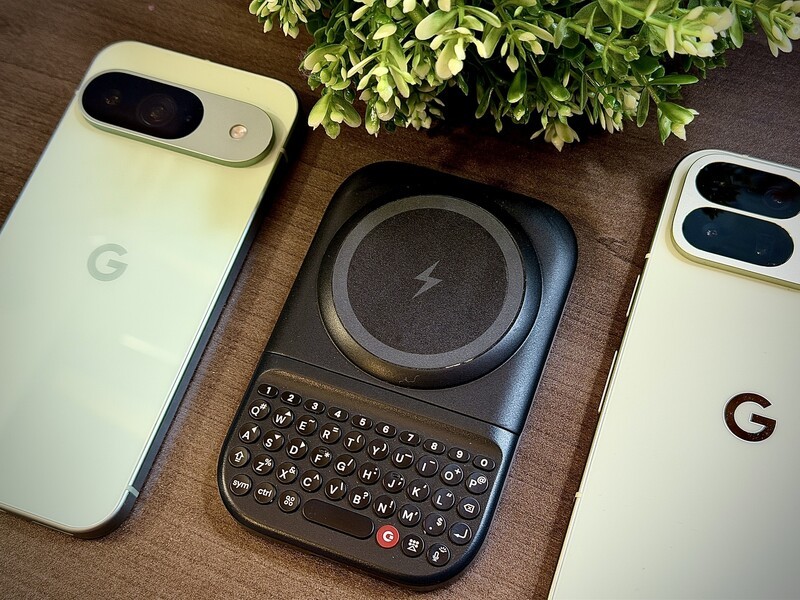
We believe that technology should adapt to your needs, not the other way around. Since the inception of Clicks, we've been obsessed with reclaiming screen real estate and bringing back the tactile precision of a physical keyboard. With the launch of the Clicks Power Keyboard, we are extending that mission to a far broader ecosystem of devices, including the world of Google Pixel.
If you are a Pixel user wondering if you can finally get the precision and speed that the Power Keyboard offers on your smartphone, the answer is a resounding yes!
There are a few minor caveats to getting your "Power Keys" up and running with certain Pixel models. But hey, that's exactly what this guide is for!
How to Connect Clicks Power Keyboard to Pixel Phones
The Clicks Power Keyboard is designed to be universal and pocketable. Unlike the original Clicks iPhone cases or the Pixel 9/10 specific keyboard case, the Power Keyboard attaches to smartphones using a high-strength MagSafe or Qi2 magnetic connection.
For the Google Pixel community, this is a big deal. Starting with the Pixel 10 series, Google has natively adopted the Qi2 standard, meaning the Power Keyboard will snap directly onto your phone without any extra hardware.
Using an Older Pixel?
If you're rocking a Pixel 9, Pixel 8, or older, don't worry. You can still use the Power Keyboard by using a MagSafe-compatible case or an adhesive magnetic ring. Once the magnetic connection is established, the Power Keyboard pairs via Bluetooth and you're ready to type.
Pairing with Pixel
The Clicks Power Keyboard pairs to devices through Bluetooth. You can pair and switch between three different devices. Just press and hold the power key, then press whichever number you want to assign it (between 1-9). You can read more in our setup guide for Android users.
Pixel Compatibility Table
The Power Keyboard is a versatile tool that functions as both a Bluetooth keyboard and a wireless power bank. Here is how it works across the Google Pixel line-up:
| Pixel Model | Native Magnetic Attachment? | Wireless Charging Support? | Keyboard Functionality? |
|---|---|---|---|
| Pixel 10 / 10 Pro / 10 Pro XL | Yes (Native Qi2) | Yes | Yes |
| Pixel 9 / 9 Pro / 9 Pro XL | Via MagSafe Case | Yes | Yes |
| Pixel 8 / 8 Pro | Via MagSafe Case | Yes | Yes |
| Pixel 7 / 7 Pro | Via MagSafe Case | Yes | Yes |
| Pixel 6 / 6 Pro | Via MagSafe Case | Yes | Yes |
| Pixel "a" Series (with Wireless Charging) | Via MagSafe Case | Yes | Yes |
Pro Tip: The Power Keyboard features multiple slider positions, allowing it to adjust to everything from a standard Pixel to the larger "Pro XL" models.
More Than Just a Keyboard: Power to the Pixel
The Power Keyboard features a built-in 2,300 mAh battery. When your Pixel is magnetically attached, the keyboard can wirelessly top up your phone, acting as a functional power bank while you work.
- Customizable Power: Use the Clicks App on Android to reserve battery specifically for typing, ensuring you never lose your keyboard functionality, even if you're out of juice for charging.
- Landscape Mode: Rotate your Pixel to landscape and slide the keyboard out for a comfortable, laptop-like experience when editing spreadsheets or long-form emails.
- Multi-Device Pairing: You can pair your Power Keyboard with your Pixel, your tablet, and even your smart TV simultaneously, switching between them with a simple keyboard shortcut.
Experience the Tactile Revolution
Whether you're a digital nomad or a professional looking for faster triage on the go, the Clicks Power Keyboard brings a consistent, confident typing experience to your Google Pixel. It can help you harness the built-in Android shortcuts (which most people don't even realize are baked right into the operating system) and for anyone who "walks in both worlds" (Android smartphone, Apple accessories) it can also be paired with an iPad, Apple TV, or VisionPro.
Read more
Samsung's Phones Don't Have Magnets But You Can Still Use Power Keys
The Clicks Power Keyboard relies on a high-strength magnetic connection to "snap" onto the back of your smartphone. While this is a native feature for some devices, Samsung Galaxy phones just refuse to adopt this feature. Having a built-in magnetic ring in the chassis is standard with many other phones, but not galaxy devices. At least not as of 2026. Having no magnetic ring on...

Which Phones is the Clicks Power Keyboard Compatible With?
One of the most frequent questions we receive is whether the new Clicks Power Keyboard will fit a specific phone model. While our original keyboard cases were precision-engineered for specific flagship models. The Power Keyboard marks a significant shift toward universal, cross-device compatibility. Because Power Keys uses a magnetic attachment system rather than a wrap-around...
Clicks Power Keyboard: The Samsung Galaxy Compatibility Guide (2021–2026)
One of the most frequent questions we get at Clicks is: "Will it fit my phone?" With the launch of the Clicks Power Keyboard, the answer is almost certainly yes. Unlike our original case-style keyboards, the Power Keyboard uses a universal magnetic slider. This means that as long as your phone has a way to attach to a magnet (built-in, through a compatible case, or by adding a magnetic...
The Samsung Users' Guide to Clicks Power Keyboard
For years, the Samsung Galaxy experience has involved a silent trade-off. We gained some of the most stunning mobile displays in the world, but we keep losing that real estate to the digital keyboard any time we try and get stuff done. The moment you need to reply to a Slack message or draft an email, that virtual keyboard slides up and consumes nearly half of that beautiful Infinity...